


Drill Bank Toolpath
Note
The Drill Bank Toolpath is part of a the Advanced Machining Module which is a paid add-on to your software.
The Drill Bank Toolpath is a variant of the drilling toolpath but specifically designed for using with Drill Banks.
Configuring a Drill Bank

The Drill Bank Template Creation tool allows you to define a reusable drilling pattern (a drill bank) that can be applied consistently across cabinet parts. This is typically used for operations such as shelf pin holes, dowel holes, or construction drilling that must follow a precise and repeatable layout.
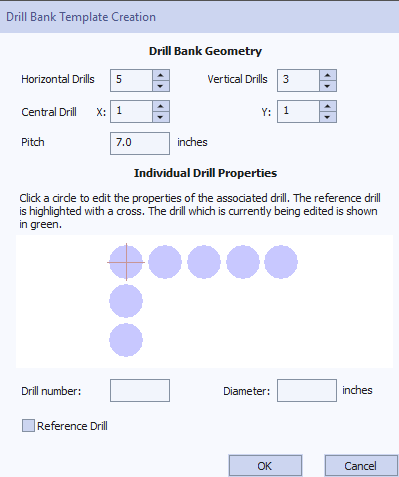
Horizontal Drills
Specifies the number of drill holes arranged horizontally.
Vertical Drills
Specifies the number of drill holes arranged vertically.
Central Drill (X, Y)
Defines which drill in the grid is considered the central reference drill.
- X represents the horizontal index
- Y represents the vertical index
This reference drill is used as the origin point when positioning the drill bank relative to a part.
Pitch
Defines the spacing between adjacent drill holes.
All holes are evenly spaced using this value. Units are shown alongside the field (for example, inches).
Drill Selection
- Click on any drill marker in the preview to edit its properties
- The currently edited drill is shown highlighted
- The reference drill is marked with a cross
This makes it easy to visually identify both the active drill and the reference point of the pattern.
Drill Number
Specifies the tool number used for this drill. This corresponds to the drill definition used by the machining system.
To support machines that number the horizontal and vertical drill arrays independently, the drill that is common to both can be assigned a number for each.
Diameter
Specifies the diameter of the selected drill hole. The unit is shown next to the input field. The display will update to give a visual overview.
Reference Drill
Marks the selected drill as the reference drill for the bank.
Only one drill can be the reference drill at any time.
Drill Preview
The graphical preview displays the full drill bank layout based on the current settings. Changes to geometry, pitch, or individual drill properties are reflected immediately, allowing you to visually confirm the pattern before saving.
Pitch Tolerance
The tolerance used for the pitch when looking for matching drill patterns.
Diameter Tolerance
The tolerance used for the diameter when looking for matching drill patterns.
Position and Selection Properties
Safe Z
The height above the job at which it is safe to move the cutter at rapid / max feed rate. This dimension can be changed by opening the Material Setup form.
Home Position
Position from and to that the tool will travel before and after machining. This dimension can be changed by opening the Material Setup form.
Project toolpath onto 3D Model
This option is only available if a 3D model has been defined. If this option is checked, ✓ after the toolpath has been calculated, it will be projected (or 'dropped') down in Z onto the surface of the 3D model. The depth of the original toolpath below the surface of the material will be used as the projected depth below the surface of the model.
Note:
When a toolpath is projected onto the 3D model, its depth is limited so that it does not exceed the bottom of the material.
Vector Selection
This area of the toolpath page allows you to automatically select vectors to machine using the vector's properties or position. It is also the method by which you can create Toolpath Templates to re-use your toolpath settings on similar projects in the future. For more information, see the sections Vector Selector and Advanced Toolpath Templates.
Name
The name of the toolpath can be entered or the default name can be used.
Peck Drilling
When the option Use Peck Drilling is selected, the drill will cut to the Pass Depth set in the Tool Database for the selected Drill. It will then retract to the Retract Gap according to the retract option selected (see below), before drilling to the next depth, incremented by an additional Pass Depth. This cycle is repeated until the hole is drilled to the required depth. The retract moves are used to remove any build-up of material from the hole to help with overheating and breakage. If the Pass Depth is greater than the required Cut Depth, the hole will be drilled in a single cycle. However, if a Cut Depth of 1 inch with a Pass Depth of 0.25 inch is used the hole will be drilled in 4 cycles.